![white logo.png]](https://faq.procurementexpress.com/hs-fs/hubfs/white%20logo.png?height=46&name=white%20logo.png)
You can find purchase requests in the Requests section on the left-hand side of the screen. These are all the statuses in the PO lifecycle before the requests are approved.
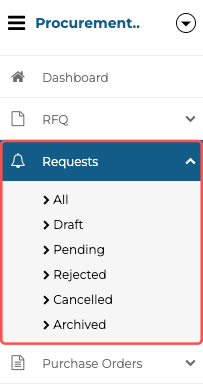
Purchase Requests are sorted into these different statuses:
- All - A list of all your purchaser requests, regardless of their status.
- Draft - A list of all your draft purchase requests.
- Pending - A List of purchase requests that are awaiting approval.
- Rejected - A List of purchase requests that have been rejected by the approvers.
- Cancelled - A list of all your purchase requests that have been cancelled.
- Archived - A list of all the purchase requests you have archived (hidden).
All the Categories, apart from "All", are mutually exclusive.
Still have a few questions? Use the Live Chat Icon in the bottom right-hand corner or send an email to support@procurementexpress.com to get in touch with the friendly support team.
If you have a feature suggestion, we’d love to hear from you! Add your feature suggestion on feedback.procurementexpress.com and upvote others you like.