![white logo.png]](https://faq.procurementexpress.com/hs-fs/hubfs/white%20logo.png?height=46&name=white%20logo.png)
Unlinking removes the connection between an invoice and a purchase order. Neither record is deleted: the invoice stays in your account (as an invoice without a PO) and the purchase order stays exactly as it is, minus that invoice.
Before you start
-
You need access to edit invoices: Finance or Company Admin, or a user whose department shares access to the purchase order.
-
The invoice cannot be settled (paid). If a payment has been recorded against it, remove the payment first, then unlink.
Option 1 — From the purchase order (quickest)
- Go to Purchase Orders → All and open the purchase order.
-
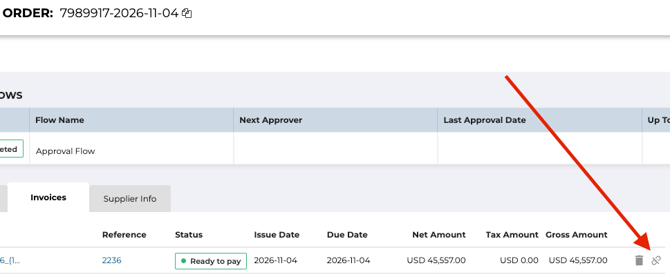
Open the Invoices tab. It lists every invoice attached to that PO.
-
Find the invoice in the list and click the unlink icon at the right-hand end of its row.
-
A dialog asks you to choose your action:
-
Unlink — removes the link and leaves the invoice as it is.
-
Unlink and Cancel — removes the link and also cancels that invoice.
-
Dismiss — closes the dialog and changes nothing (use this if you clicked by mistake).
-
Option 2 — From the invoice (works line by line)
- Open the invoice.
-
Click Match items to PO in the line items section to open the matching screen.
- In the invoice lines list, tick the matched lines and click Unlink selected, or Unlink all to clear every match on the invoice.
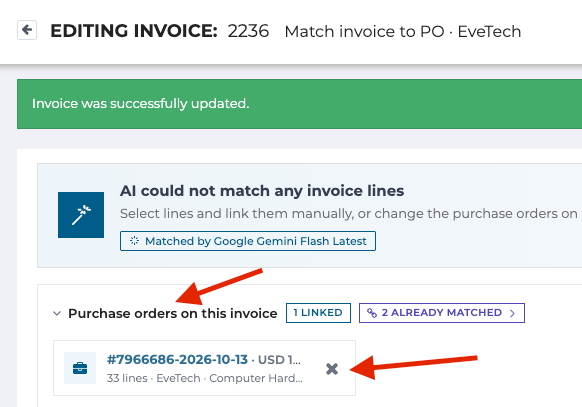
- To remove a purchase order from the invoice entirely, use the Purchase orders on this invoice panel and click Remove. If that PO still has matched lines, Remove is greyed out with the note "Has matched lines — unlink them first" — clear its lines first.
- Click Finish & review, then save, to keep your changes.
What happens after unlinking
-
The invoice's line items are no longer matched to PO lines, so the invoice is treated as an invoice without a PO — on the invoice page, in the edit form and in reports that separate linked from unlinked invoices.
-
The purchase order no longer counts that invoice towards its invoiced or paid amounts. If no other invoice is linked to it, its payment status returns to Unpaid.
-
Both records keep an audit trail: the PO's comments show "has unlinked an invoice <number>" and the invoice shows which PO was unlinked.
-
Nothing is deleted. If you unlinked by mistake, simply match the invoice to the purchase order again.