![white logo.png]](https://faq.procurementexpress.com/hs-fs/hubfs/white%20logo.png?height=46&name=white%20logo.png)
When you split a purchase-order line across multiple budgets, ProcurementExpress shows you the impact on each budget as you allocate.
-
Create or edit a purchase order and open a line item that you want to allocate to a budget.
-
Allocate the line across one or more budgets using the allocation rows.
-
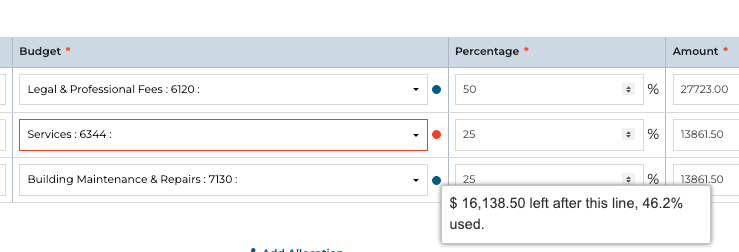
Watch each allocation row for a severity-coloured balance line - it tells you whether that budget still fits, and flags it red if the allocation pushes it over.
-
If a line is split across budgets, the impact is reported in aggregate: which budget broke, and how many are fine.
-
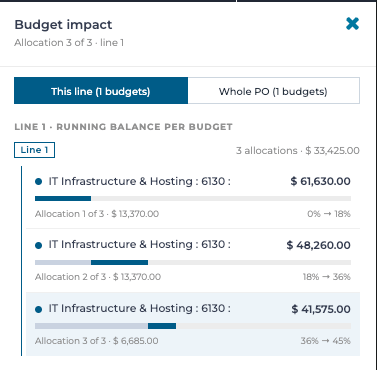
Check the full roll-up in the budget impact drawer, and the PO-level footer that catches budgets pushed over by different lines.
If budget overruns are allowed on your account (the default), the impact copy tells you so and lets you proceed knowingly.
Balances are only shown when your company has remaining-budget visibility switched on for team members.