![white logo.png]](https://faq.procurementexpress.com/hs-fs/hubfs/white%20logo.png?height=46&name=white%20logo.png)
Want a copy of everything that has happened on a purchase order? You can now download its full history as a PDF or Excel (XLSX) file.
Prerequisites:
-
You need at least View access to the purchase order.
-
Suppliers can download their own activity history from a purchase order sent to them.
To download a purchase order's history:
-
Open the purchase order.
-
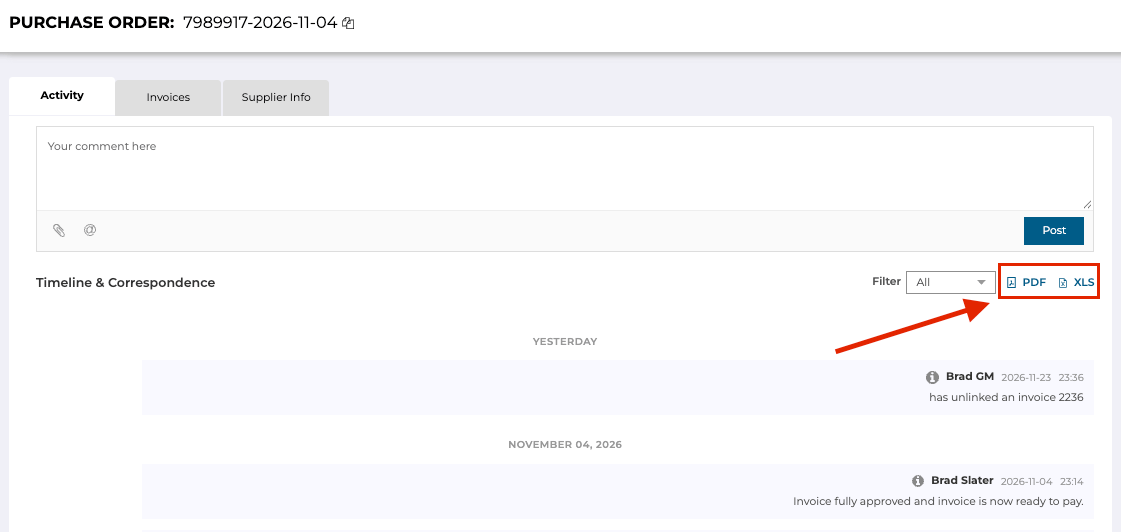
On the history window (the Activity tab, or the HISTORY / Delivery History sections), find the two download links beside the heading.
-
Click **PDF** to download an A4 landscape PDF, or **XLS (Excel)** to download a workbook.
-
Open the downloaded file – it includes the PO details, activity, delivery history and, for you, the supplier account's section.
Notes:
-
Every download holds all the history sections in one file, so the PDF and spreadsheet match what you see on screen.
-
Each section is capped at 5,000 rows; very long histories note this in the file.
-
The PDF uses the same status and delivery labels you see in the app.
-
Suppliers see only their own comments and the delivery history on the share page – never internal comments or staff names.